Line 6 Helix Stadium Native Review: Agoura Amps, Proxy Clones, and the Studio Helix You’ve Been Waiting For
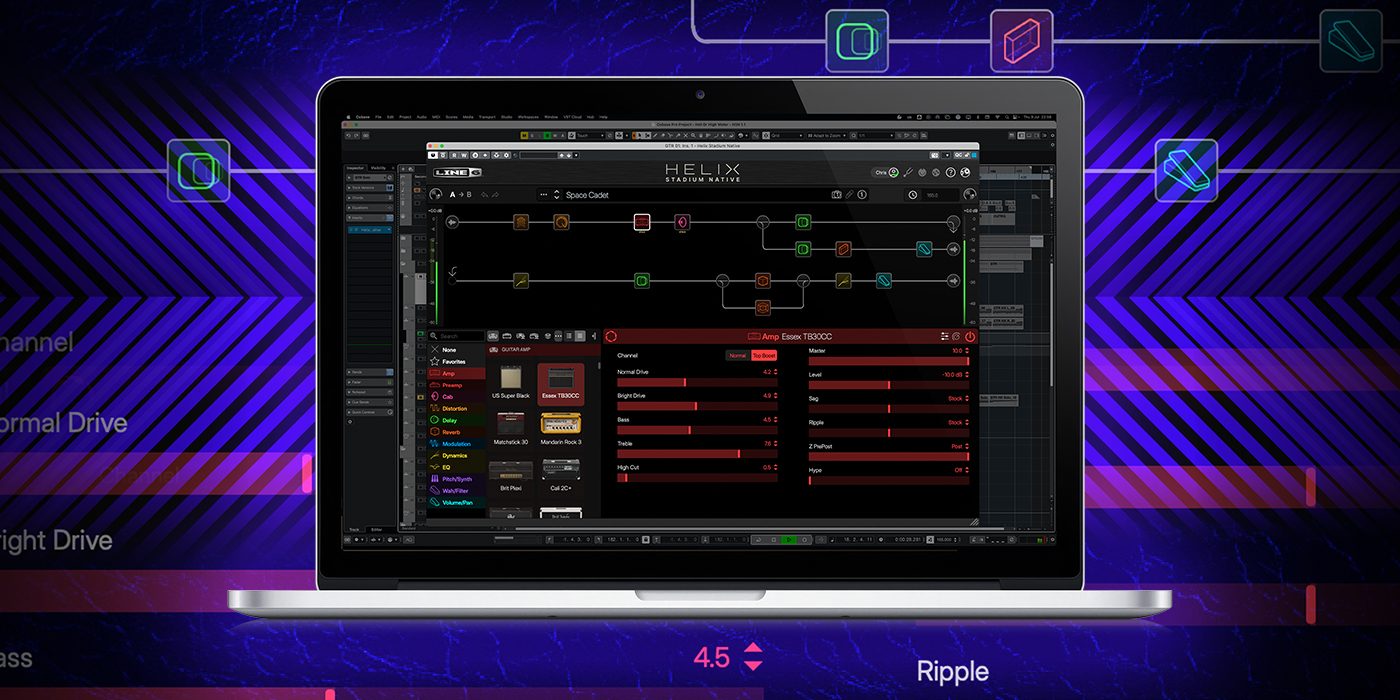
Image: Line 6 (Helix Stadium Native product marketing). Used for editorial review coverage.
Agoura amp modeling, Proxy clone loading, Focus View, 48 blocks and 192 kHz—the Stadium brain finally lives in your DAW. Here’s who should pay $399.99, who should upgrade for $99.99, and who should start with the free Intro.
If you’ve spent the last decade living inside Helix presets—whether on a Floor, an LT, an HX Stomp, or the original Helix Native plugin—you already know the muscle memory: drag a block, split a path, stash a snapshot, hit record. What you haven’t had, until now, is the Stadium generation of that ecosystem sitting natively in your DAW.
Helix Stadium Native is Line 6’s plugin version of the Helix Stadium / Stadium XL hardware. It brings the new Agoura amp models, Proxy clone loading, a renovated UI (Focus View, Hype, graphic mic placement), and studio-friendly routing upgrades into AAX, AU, and VST3. Launch pricing is $399.99 for most buyers—or $99.99 if you already own Helix Stadium hardware or original Helix Native—with a free, perpetual Intro tier and a 15-day full trial so you can hear the difference before you open your wallet.
Here’s the player-first walkthrough—what it is, who it’s for, what Agoura and Proxy mean under your fingers, how it fits a home studio, and where the caveats live.
What Helix Stadium Native actually is
Think of Stadium Native as Helix Stadium’s brain living inside your DAW—no floor unit required. Per Line 6’s own FAQ and product pages, you get the same amp, cab, and effects model set as Helix Stadium hardware (minus hardware-specific looper models), plus:
- Proxy clone loading (amp+cab, amp, preamp, and distortion captures created with Stadium hardware / the Proxy cloud engine)
- Third-party cab IR loading
- Preset compatibility with Helix Stadium XL and Stadium Floor when Hardware Compatibility mode is left on
- Ability to import older Helix / HX / Helix Native presets (from firmware / plugin v3.50 or later)
It is not the Helix Stadium desktop app (that’s still the hardware editor/librarian). Stadium Native is a true amp-and-effects plugin: drop it on guitar, bass, synth—or, as Line 6 jokes, bagpipes—and run as many instances as your CPU allows.
Formats: macOS VST3/AU/AAX; Windows VST3/AAX. One Line 6 account license covers up to four computers. No standalone app—you need a DAW host (or Stadium hardware) to play.
Who it’s for (and who should pause)
Great fit if you:
- Record at home or in a project studio and want one plugin that covers cleans, crunch, high-gain, bass, and a deep effects library
- Own Helix Stadium Floor / XL and want studio tones that travel to the stage (and back) without rebuilding presets
- Own original Helix Native and want Agoura + Proxy + the Stadium UI upgrades at the $99.99 upgrade price
- Are a producer/engineer who already stacks amp sims on guitars and uses them as creative color on non-guitar sources
- Want a free on-ramp via Stadium Native Intro before committing cash
Pause / reconsider if you:
- Only need a handful of curated amp tones and hate deep menus (Neural DSP Archetype-style suites or UA Paradise may feel faster)
- Want to create your own captures on the desktop (Stadium Native can load Proxy clones—it cannot make them; that still requires Helix Stadium hardware + Proxy)
- Need a lightweight standalone player for couch practice with zero DAW friction
- Are starting from zero Line 6 history and the full $399.99 sticker feels steep next to ToneX, Bias X, or Paradise on sale
Pricing, verified (September 2026)
From the official Helix Stadium Native FAQ:
- Full license (new buyers): $399.99
- Registered Helix Stadium XL or Stadium Floor owners: $99.99
- Upgrade from Helix Native: $99.99
- Upgrade from POD Farm Platinum: $199.99
- Upgrade from POD Farm: $299.99
- Intro license: Free, no expiration
- Full feature trial: 15 days
Grace period: Helix Native purchased and registered June 4–August 4, 2026 upgrades to full Stadium Native for free, per Line 6.
Original Helix Native stays at $99.99 for registered Helix Floor/Rack/LT and HX Effects/Stomp/Stomp XL owners who need classic preset compatibility. Stadium Native and Helix Native install as separate plugins, so old sessions stay intact.
Where to buy / availability: Digital download only—Line 6 Online Shop and retailers like **Sweetwater** (electronic license). No Amazon ASIN for the plugin itself at draft time. Released early August 2026; major hands-on reviews landed in late September 2026.
Agoura, in player language
Line 6 named Agoura after the Calabasas road where the company lives—and they’re clear it’s a new methodology, not “HX with better marketing.” Officially it’s sub-component behavioral modeling: instead of only approximating what each circuit stage does, Agoura leans into how stages interact—power amp with power supply, gain stages with impedance, transformers with cab load, tubes measured with real plate/grid behavior.
Under the fingers, that reads as:
- More three-dimensional touch dynamics—dig in and it blooms; roll the guitar volume back and it cleans up more like a real head.
- Honest pedal stacking—Guitar World called out Screamer-into-Twin sounding fatter and more amp-like on Agoura than older legacy Twin models.
- Smarter amp ↔ cab behavior—power sections “see” cabinets more like a head in front of a real 4×12.
You still get the classic HX amp library in the same plugin, so A/B is built in. Keep your favorite HX Panama Red or Litigator if you love it; park an Agoura Brit or Fender-style model next door and decide with your ears.
Hype and Focus View (the “speed of thought” bits)
Two Stadium-era controls that matter more than marketing slides suggest:
- Hype morphs an Agoura amp from “as accurate as we could measure the original” toward a more idealized, mix-ready version—tighter lows, smoother highs, more “record” and less “raw garage.” Sometimes you’ll love it (Princeton-style sparkle). Sometimes you’ll dial it back to keep a Twin’s mid scoop honest. Either way, it’s a musical dial, not a gimmick.
- Focus View replaces endless parameter diving with a contextual graphic: drag toward zones like Clean / Rock Rhythm / Lead (or Growl / Scooped on an SVT) and watch multiple knobs move together. On cabs, Focus View becomes graphic mic placement—drag the mic on/off axis and in/out from the cone instead of typing distances. For session players, that’s the difference between finding a tone and finishing a take.
Proxy clones: what they are (and what they’re not)
Proxy is Line 6’s cloud-assisted cloning engine for Helix Stadium hardware. Capture an amp, preamp, amp+cab, or distortion pedal on Stadium; training data goes to Line 6 servers for heavier processing than onboard DSP usually allows. You get a `.clone` file.
Stadium Native can load those clones. It cannot create them. That’s the hard line versus desktop-first capture tools like IK ToneX.
Practical path: export clones from Stadium via the Helix Stadium app, grab files from CustomTone or third-party vendors, drop `.clone` files into your User Clones folder (check plugin Settings for the path), then load them from Amp / Preamp / Distortion browsers.
Clone quality varies with the capture—same as Kemper or ToneX. Treat Proxy as an expansion lane, not a day-one replacement for factory Agoura/HX models. Intro allows up to 4 clones per preset; full license with Hardware Compatibility off documents up to 48 for studio-only presets.
Key features that change studio work
Beyond “more amps,” Stadium Native earns its keep with workflow upgrades Helix Native users will feel immediately:
- 48 block locations (up from 32 on original Native)
- Multiple splits/merges per path for denser parallel rigs
- Sample rates up to 192 kHz (original Native topped out at 96 kHz)
- Dual cab blocks at 2× base IR resolution; effects can sit between linked amps and cabs
- Sidechaining on Dynamics and select Filter blocks (ducking delays, keyed envelopes—finally native to the Helix plugin workflow)
- Search across presets, blocks, IRs, and clones; nested folders instead of rigid setlist/IR caps
- Preset Clips on factory presets so you can audition tones with a dry guitar/bass performance without constantly stopping to play
- Clearer DAW automation naming and lane values
- Improved needle/strobe tuner with sharps or flats
Line 6’s FAQ lists the full/trial set around 53 Agoura + 111 HX channels, 46 cabs, and 274 effects (marketing sometimes rounds to “130+ amps / 260+ effects”; expect free model updates over time).
Free Intro: what’s actually in it
Intro is a permanent subset—not an expiring teaser. Documented Agoura highlights include Deluxe-style blackface, AC30-style combo, JCM800-style Brit, Revv-style high gain, and Ampeg SVT-style bass, plus matching cabs, a curated effects pack (Centaur-/Screamer-/RAT-/Big Muff-inspired drives; classic mods/delays/reverbs), IR loading, and limited Proxy loading. Never owned Helix software? Start here.
System requirements and performance notes
Per MusicRadar’s published specs and Line 6 documentation:
- macOS: v14 Sonoma or later (Intel and Apple Silicon)
- Windows: Windows 11 64-bit
- CPU: Intel i5 or Apple M1 at ~2.5 GHz or higher (or better)
- RAM: 8 GB minimum (up from 4 GB on original Helix Native)
- Disk: ~1 GB free
- Internet required for initial authorization / trial
Hands-on reports: complex presets can still run at low buffer sizes on capable machines (MusicRadar ran a busy multi-block preset at 32 samples without crackles). Still—CPU scales with instances, IR length, pitch blocks, and sample rate. Plan headroom at 96/192 kHz with multiple live instances.
Reviewer caveats: UI can feel slow to open when flipping windows (MusicRadar/Pro Tools); Windows HiDPI scaling can leave text tiny on some monitors (Guitar World; macOS reportedly fine); a few small UX nits at full price. No special GPU requirement—traditional native DSP.
How it fits a home / studio recording workflow
A practical session shape:
1. DI everything (optional reamp send) so tones stay revisable. 2. Park Stadium Native inline or on a stereo FX track for easy multi-instance A/B. 3. Start with Focus View + a factory Preset Clip, then refine mic/EQ graphically. 4. Use snapshots for verse/chorus/solo moves; automate like hardware. 5. Print or freeze when the mix gets heavy—or keep live if CPU allows. 6. Own Stadium Floor/XL? Leave Hardware Compatibility on for gig presets; turn it off only for studio-only monsters.
Don’t sleep on Helix effects as production tools—Retro Reel on buses, springs on vocals, grit on synths.
Setup tips: authorize once; set Clones/IRs/Presets folders before hoarding files; import old Helix/HX assets from v3.50+ exports (Stadium presets do not go backward); keep original Helix Native installed for legacy sessions; match buffer to playing feel first.
Honest value check vs the competition
Vs Helix Native: Already paid in? $99.99 is the no-brainer—Agoura, Proxy loading, 48 blocks, 192 kHz, dual cabs, sidechain, Focus/Hype. Full $399.99 buys a complete ecosystem, not a light amp pack.
Vs Neural DSP: Neural wins on instant artist vibe and standalone practice. Stadium Native wins on breadth, routing depth, and Helix continuity.
Vs ToneX: ToneX still leads if you want to capture your amp on a laptop today. Native’s Proxy story is load-Stadium-clones + deep factory modeling. Many players will run both.
Vs UA Paradise / Bias X: Often cheaper and faster to a finished tone. Stadium Native is the Swiss Army bunker—more knobs, more paths, more weird parallel-routing evenings.
MusicRadar and Guitar World both land near the same place: pricey at full retail, exceptionally complete if you live in a DAW—with caveats around no standalone, no Proxy creation, and Windows scaling.
Verdict
Helix Stadium Native is Line 6 finally putting the Stadium brain where a huge chunk of modern guitar work actually happens: inside the session. Agoura is the headline for feel and authenticity; Proxy is the expansion pack for capture culture; Focus View / Hype / dual cabs / sidechain / 48 blocks are the daily drivers that make the plugin feel current rather than “Helix Native with a skin.”
At $99.99 for Stadium hardware or Helix Native owners, it’s an easy yes. At $399.99 full freight, it’s a serious software purchase—justify it with the free Intro tier and 15-day trial, not with FOMO. If you need desktop capture creation or a standalone practice app, look elsewhere (or pair Native with ToneX / a small Neural suite). If you want one plugin that can cover a whole album’s guitar and bass sounds—and optionally talk to a Stadium Floor on gig night—this is currently one of the strongest “complete rig in a plugin” options on the market.
Play the free Intro. Trust your hands. Then decide.
Experience-driven coverage, not algorithm bait.
- 20+ years of guitar playing experience
- Real-world retail experience at Guitar Center
- Thousands of hours testing guitars, amps, and pedals
- A community of 50,000+ guitar enthusiasts across platforms
- Partnerships with Fender, DistroKid, TrueFire, Card Chords, and Enya
- Editorial standards published openly — see how we test gear
The Modern Guitar Magazine. Delivered to your inbox.
No spam. No gimmicks. Just great guitar content — stories, tones, iconic solos, and honest gear takes. Every week.
Ask GP
3 free questions a dayStill curious? Ask GP about this story.
Your personal classic-rock and guitar guide — ask anything about Line 6 Helix Stadium Native.
Discussion (0)
Sign in to join the discussion.
Sign in to commentLoading comments…
Discover another guitar story
Swipe through our latest features, breaking news and iconic solos — one story at a time.
Open Swipe →More in Signature Gear
Valeton GP-200 Review: Is This the Budget Helix We’ve Been Waiting For?
Eight footswitches. Expression pedal. XLR outputs. MIDI. Effects loop. IR loading. More than 240 effects and 140-plus amp and cabinet models. The Valeton GP-200 looks suspiciously like the kind of rig that used to require considerably more money.
Marcus King’s First Guitar Comes Full Circle: Inside the New Epiphone El Dorado
The new Marcus King El Dorado isn’t simply another signature guitar. It recreates the Epiphone that helped start King’s musical life — and it might be one of the most interesting artist acoustics Epiphone has released in years.
Slash Has Used a Talk Box Since He Was 16. Now MXR Has Built One Specifically for Him
The new MXR Slash Signature Talk Box takes one of rock guitar's strangest and most expressive effects, traces it back through Peter Frampton, Jeff Beck and Aerosmith, and rebuilds it around the unmistakable voice of Slash.